Catwalking Grizzly
by Lindy Martin
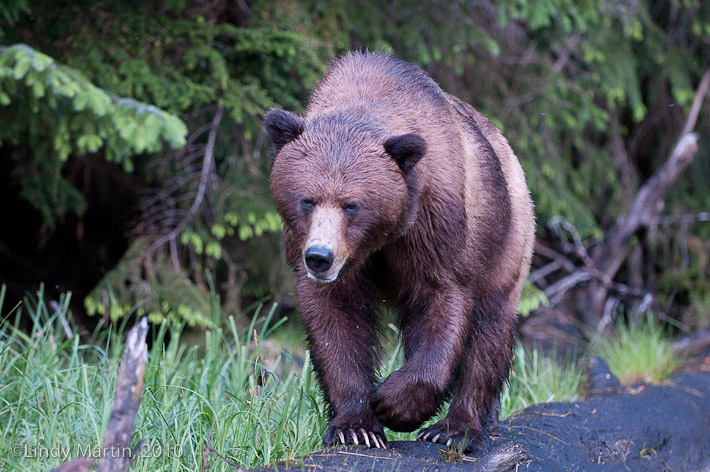
She walked just like a model on a cat walk. Unfortunately, it was just about dark - late dusk in lots of rain with the ISO cranked up to 1000 so I could capture her without a flash. It was great just to see her for real so a "not so great' photo is better than nothing. I don't do much post processing - what should I do with this image?
1/400th at 2.8 Nikon 70-200 ISO 100, Nikon D300 HH

Comments
7 commentsI like the raised paw and the "determined" look in the bear's eye. If this image isn't full frame (and you have room to work with) I'd crop some from the right (possibly adding the equivalent amount to the left side of the frame) AND add a little more room on the bottom.
There is a colour cast (producing a little too much red/magenta) that I think is related to the WB issues shot at high ISO's (I've experienced the exact same issue with that camera at high ISO's). My experience is that it's kinda tough to get rid of - I had to both tweak WB during raw processing and then selectively add some warming (using photo filters) in Photoshop.
Cheers...and I think this shot is WAY "...better than nothing" - definitely a keeper!!
Brad
I agree with moving the subject to the right. I also would remove the oof partial branch in the left foreground. As to the cast, if you did not shoot this in raw as Brad mentioned, then simply go to Levels and click where it says, RGB and select Red. Once there, move the left hand slider in a bit. And you might also move the Blue in a bit.
If you have Photoshop, create a curves layer, select the blue channel (ctrl +3) then adjust the curve until you see these numbers, 110 output, 155 input. That should take care of the blue cast nice and quickly.