Gallery: LandscapePosted December 10, 2010205 views13 comments
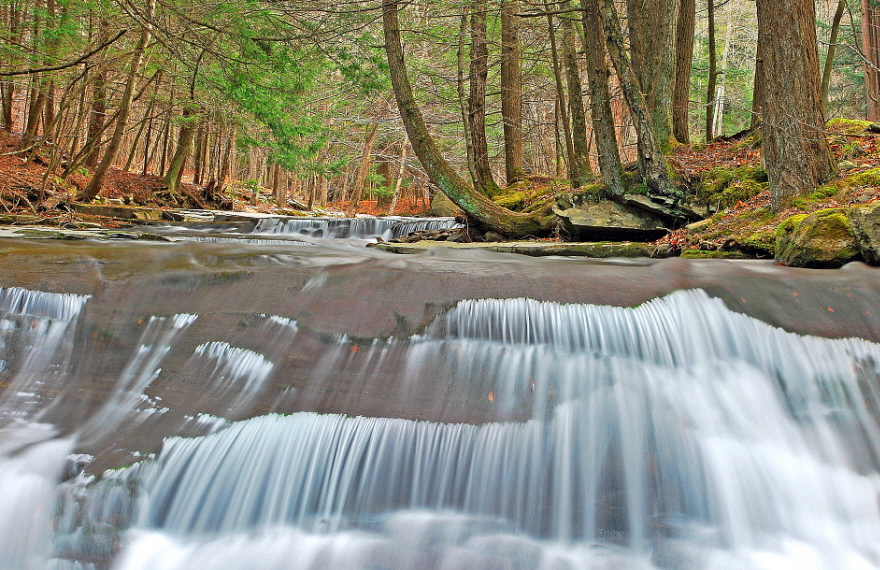
Being the size of a small bear, I took to the middle of this stream waiting for the salmon. None showed. Maybe next year!
Larger posted, C&C always welcomed.
Comments
13 comments
Comment posted by Guy Tal on December 10, 2010 at 1:44 PM
Beautiful patterns in the water. Excellent image!
Guy
Registered on November 1, 2003, 566 Posts, 15507 Comments
Comment posted by Raymond D Smith on December 10, 2010 at 2:40 PM
That is some texture in the water and I like the in your face composition. The shadows appear to be lifted a little too much, it might work well with them darken a bit. That might help the eye focus on the water. Cheers
Registered on January 22, 2009, 12 Posts, 479 Comments
Comment posted by Luke Ormand on December 10, 2010 at 3:27 PM
Bill,
I played with it in Photoshop... boost the blacks to make it come alive. Boost them a lot to give it an HDR effect. This photo is gorgeous with the right processing - I'd say your best moving water shot.
Registered on February 4, 2009, 1093 Posts, 7035 Comments
Comment posted by Robert Stough on December 10, 2010 at 3:54 PM
Excellent shot. Very nice composition and perfect shutter speed for this flow. I might cut the overall exposure value just a bit but in any case this is good work.
Registered on November 20, 2010, 26 Posts, 273 Comments
Comment posted by Rick Gomez on December 10, 2010 at 5:51 PM
I think it looks great. I do see some sharpening halos in both the large and small version. But the image looks fantastic!
Registered on March 3, 2007, 206 Posts, 1853 Comments
Comment posted by John Mumaw on December 10, 2010 at 6:04 PM
This is an excellent composition, but yet again, the shadows (blacks) have been leached out in processing far too much.
Registered on September 9, 2005, 62 Posts, 2289 Comments
Comment posted by Bill Maile on December 10, 2010 at 6:08 PM
John, Luke... show me what you mean then. Email me, which I'd prefer, or post.
I really appreciate the fine tuning. It's just amazing to me what is right, and what is "wrong"...
Registered on March 2, 2009, 984 Posts, 2518 Comments
Comment posted by John Mumaw on December 10, 2010 at 7:42 PM
Email sent.
Registered on September 9, 2005, 62 Posts, 2289 Comments
Comment posted by Bill Maile on December 10, 2010 at 11:46 PM
Thank you John Mumaw (great work) and all, I see some MAJOR improvements!! To my eye, the answer lies somewhere in the middle (more toward the repost), but... I'll continue to work on this and appreciate the help and advice from everyone. Frustrating is all.
Registered on March 2, 2009, 984 Posts, 2518 Comments
Comment posted by Doug Roane on December 11, 2010 at 2:02 AM
I'm really enjoying the comp here, Bill and the shutter speed you chose. The midtones, for me, are too bright - a simple pull down in the middle of a curves adjustment layer oughta do the trick.
oh, ok - I see the repost. I think you pulled it down a little too much. I would leave the blacks alone
Registered on December 12, 2008, 213 Posts, 2226 Comments
Comment posted by Scott Smorra on December 11, 2010 at 12:24 PM
I like the repost much better Bill. The original is a little too flat for my tastes. I like the contrast levels in the repost with the deeper blacks.
Registered on November 2, 2009, 161 Posts, 2143 Comments
Comment posted by Luke Ormand on December 11, 2010 at 1:44 PM
Bill,
The repost looks just like what I'd done on my computer... compression doesn't allow for the full effect of how nice a photo it really is.
Registered on February 4, 2009, 1093 Posts, 7035 Comments
Comment posted by Bill Maile on December 11, 2010 at 1:55 PM
Hey Luke, just happened to be on the computer. Thanks as always!!! :) It certainly is much improved, hopefully I'll get this correct someday soon. I still do prefer a bit lighter on the trees/leaves, etc., somewhere just a tad brighter than here. But it certainly made a big difference.
OH, just checked the specs cause I hadn't... ISO-100, 4 seconds, f-22.0, 44mm, D60 with CPL, tripod and me in creek.
Registered on March 2, 2009, 984 Posts, 2518 Comments

Comments
13 commentsGuy
I played with it in Photoshop... boost the blacks to make it come alive. Boost them a lot to give it an HDR effect. This photo is gorgeous with the right processing - I'd say your best moving water shot.
I really appreciate the fine tuning. It's just amazing to me what is right, and what is "wrong"...
oh, ok - I see the repost. I think you pulled it down a little too much. I would leave the blacks alone
The repost looks just like what I'd done on my computer... compression doesn't allow for the full effect of how nice a photo it really is.
OH, just checked the specs cause I hadn't... ISO-100, 4 seconds, f-22.0, 44mm, D60 with CPL, tripod and me in creek.