Nature Photographers Network
This is the preserved archive of the original Nature Photographers Network. The community continues at naturephotographers.network.
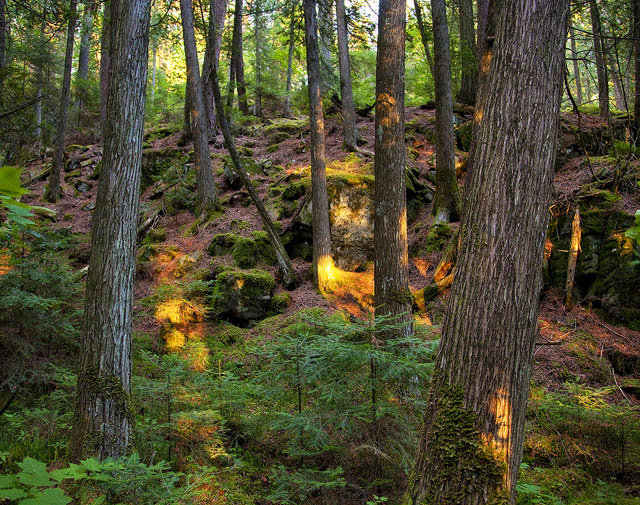
Dense Forest at Sunset
‹ PreviousLandscape GalleryNext ›

Dense Forest at Sunset

by Kory Lidstrom

Gallery: LandscapePosted September 6, 2010194 views10 comments
Taken earlier this summer in the Boundary Waters in northern Minnesota. As I've noted before, finding compos in these very thick forests is tough. This is the best spot I've found thus far.

What do you guys think of this image? Please be honest. I'm having a tough time deciding how feel about this one, so your comments are most appreciated.

5DMK2, f/4, 24mm, 1/25th, ISO 800, same RAW processesed twice. (I had to hand-hold this one because the light was fading very fast. I was on a scouting mission and didn't expect to find these light rays penetrating so deep into the forest, or I would've lugged my tripod with. And, as luck would have it, these rays weren't there the following night. Lesson learned.)

Comments

10 comments
Comment posted by Kory Lidstrom on September 6, 2010 at 5:08 PM
Hmm, again this site has desaturated my image. Why does that keep happening? It's happened twice in a row now. It never used to happen. Am I missing something?

Also, I should've selected a black background. My bad.
Registered on November 19, 2008, 49 Posts, 1035 Comments
Comment posted by Marc Adamus on September 6, 2010 at 5:15 PM
I thought the forest may have been on fire in the thumbnail and it wasn't so that's a plus. The light here is very warm but rather scattered and strongly defined. I think the light adds a little to the scene but I'm a little torn about the kinda spotlighting effect here. Also, that white sky up top isn't adding much. I'm not sure what you're seeing with the desaturation, because to my eye it definitely couldn't use any more! It's very vibrant. I changed your background.
Registered on September 17, 2005, 780 Posts, 8091 Comments
Comment posted by Kory Lidstrom on September 6, 2010 at 5:25 PM
Thanks for the background change.

So you really thing this is saturated to the max? Don't you think that it's bland color-wise compared to the image you just posted today? I sure do.

As for the light, thanks for the feedback. I'm torn about it, too, which is why I wanted others' opinions.
Registered on November 19, 2008, 49 Posts, 1035 Comments
Comment posted by Marc Adamus on September 6, 2010 at 5:37 PM
I can't possibly see it needing more saturation. It's all about how much saturation is available in the scene before things start looking outta-whack. That changes for everyone I know much I don't think you can get away with any more than this. My computer may be displaying it as you originally intended though, I don't know.
Registered on September 17, 2005, 780 Posts, 8091 Comments
Comment posted by Eva McDermott on September 6, 2010 at 5:43 PM
Love the serenity of thi image Kory. The warm spotlights add interest.
Registered on January 4, 2009, 1015 Posts, 13229 Comments
Comment posted by Morris McClung on September 6, 2010 at 6:36 PM
I think the warm spotlighting makes this unique. I also think your comp is very well done as you managed to separate a lot of trunks to give them space. Well done.
Registered on May 7, 2007, 670 Posts, 19650 Comments
Comment posted by Richard Wong on September 6, 2010 at 9:41 PM
Cool. I like how the sunset is sprinkling in bits of warmth in the frame yet doesn't overpower the lighting.
Registered on February 2, 2006, 79 Posts, 2629 Comments
Comment posted by Tony Kuyper on September 6, 2010 at 9:56 PM
The orange light makes for some great highlights and spices up the comp. Sort of with the background were just a bit darker so as to not draw my eye away from the orange flecks.
Registered on November 1, 2003, 364 Posts, 22328 Comments
Comment posted by Ian Plant on September 7, 2010 at 2:56 PM
very natural look to the processing, a beuatiful rendering of a difficult subject to photograph
Registered on July 7, 2008, 271 Posts, 1657 Comments
Comment posted by Lon Overacker on September 7, 2010 at 4:34 PM
Kory,

First off, this is a lovely forest scene. The scattered and directional, beautifully warm light really make the image for me. With the exception of the forward trunk, I like the somewhat open space that you found where most scenes like this are so dense with trees and bush.

As far as the color and saturation goes, it looks just right on my "calibrated" monitor. I'm using FireFox 3.6.8, which is color managed. for the heck of it, I looked at your image at it has a profile of Adobe 1998. You should be saving these as sRGB. As I'm sure you know not all browsers are "color managed" and unfortunately we have to play to the lowest common denominator. I also opened this page in IE 8 and while they look nearly identical, the IE 8 version is ever so slightly less saturated - barely noticeable.

I would try a couple things. Check your image in the "Save for web and devices" dialogue and make sure you have the "2-up" view. Make sure the "convert to sRGB" is also selected in the pull down options. If the image isn't already sRGB, then there will likely be a distinct difference in the two windows. Taking your image as working Adobe 1998 and converting it to sRBG, then putting it in the save for web dialoge, they look the same. anyway, this probably isn't the place for a color management discussion, but I suspect that's what's going on.

For you or others who are interested, here's a nice page that illustrates this issue quite well.

The image looks great in a color managed browser

It has nothing to do with "this site," it's a browser and color profile issue.

Hope this helps and you've posted a lovely forest image.

Lon
Registered on November 24, 2006, 521 Posts, 19147 Comments