Gallery: LandscapePosted August 16, 201086 views10 comments
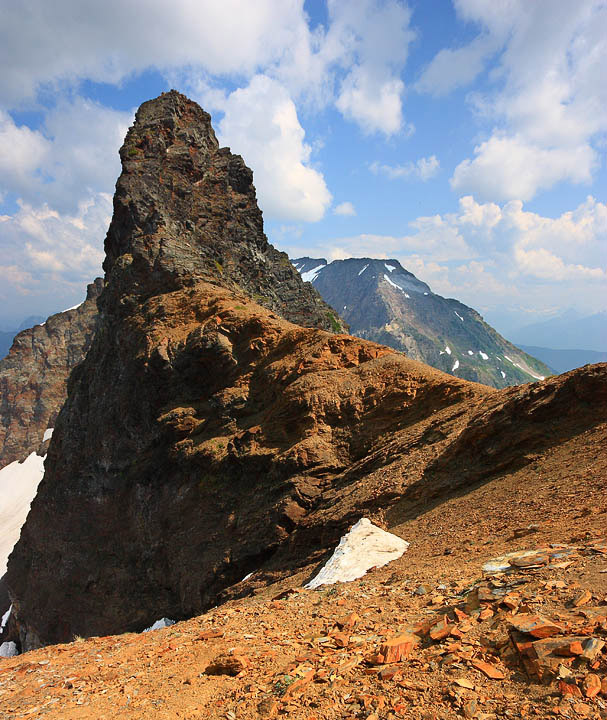
After 5hrs hiking along a ridge we came to this view point. Harsh midday light but I wasn't prepared to hike back in the dark.
XSi
efs-10-22@10mm
1/125
f11
ISO 100
Comments
10 comments
Comment posted by Phil Pogledich on August 16, 2010 at 1:47 PM
What, no shot of you on top of the pinnacle? Nice result for midday . . . I could see adding a bit more punch in the sky to bring out the contrast between the clouds and the blues. I like the way the ground in front of you seems to wind in an arc toward the top of the pinnacle.
Registered on August 24, 2009, 123 Posts, 3099 Comments
Comment posted by Lon Overacker on August 16, 2010 at 3:06 PM
Dean,
Had the same thought as Phil... did you summit the peak?
I think this showcases the peak and geology at the top well, especially for the fairly bright light. I think you did well. I would also agree with Phil that you could play around with the sky and the contrast in general. A number of ways you could take this, but this looks pretty darn natural.
Hope you made it back ok.
Lon
Registered on November 24, 2006, 521 Posts, 19147 Comments
Comment posted by dean hebert on August 16, 2010 at 10:47 PM
Thanks for the comments and suggestions.I've tried to add a little more to the sky.
Registered on August 4, 2010, 70 Posts, 1132 Comments
Comment posted by Michael J Greene, on August 17, 2010 at 1:13 PM
Hi Dean,
I like the original sky better at the top, but not at the bottom. Overall, while maybe not a "fine art" image because of the light, you did a fantastic job of handling the harshness of mid-day light and using it to present a picture to be proud of. Really nice work
Michael
Registered on June 18, 2009, 86 Posts, 2317 Comments
Comment posted by Lon Overacker on August 17, 2010 at 3:18 PM
Dean,
Looks like you used a hue/saturation layer for the sky? I like what the saturation/contrast did to the mountain top and ground here, but I think the top of the sky went a bit too far. I think that's what Michael is referring to also.
I don't know what you're using to process the images, but I was just thinking the sky needed some contrast. Actually the sky isn't bad, over exposed or anything like that - it looks like the sky would look at the time of day you captured this. It does almost look like there's lots of moisture in the air too.
Anyway, with your permission I'd be happy to take a crack at it. Thanks for taking the time to re-work and re-post the image.
Lon
Registered on November 24, 2006, 521 Posts, 19147 Comments
Comment posted by dean hebert on August 17, 2010 at 3:46 PM
Lon, I definitly see what you and Michael are talking about. Please feel free to "take a crack" at it. Thanks,Dean
Registered on August 4, 2010, 70 Posts, 1132 Comments
Comment posted by Lon Overacker on August 17, 2010 at 4:01 PM
Dean,
Ok, here's a quick try. Now this is just my personal interpretation and it doesn't mean this is right or even better... :-) Also, working on and re-saving the jpg reduces the quality, but I hope you get the idea.
The main thing for me was to reduce the overall brightness a bit and also selectively increase contrast. In general:
- midtones levels adj layer bringing the mids to around .93 and bringing the low and high input levels closer together to increase the contrast a small bit.
- Tony Kuyper's saturation masks to play around with mostly the blues
- Tony Kuyper's burn/dodge layer masks in conjunction with selectively reducing the darker tones in the sky and also selectively darkening the mid tones both in the sky and the rocky foreground.
Painting with a low opacity of about 15% really gives great control and subtle changes.
Anyway, just a quick work of this. Hope this helps. Drop me a note if you have any questions.
Lon
edit: now that I see this posted, the blues could probably still use some color adjustments, but it was mostly the contrast I was after. Hope this looks ok.
Registered on November 24, 2006, 521 Posts, 19147 Comments
Comment posted by Tony Kuyper on August 18, 2010 at 11:28 AM
Nice improvement on your repost. I like the improved contrast in the sky. My only thought might be some additional darkening of the foreground.
Registered on November 1, 2003, 364 Posts, 22328 Comments
Comment posted by John Williams on August 18, 2010 at 7:34 PM
Wonderful scene and comp. That midday haze is hard on photos as you note. I find high radius/low amount sharpening to be helpful in cutting the haze a bit.
Registered on September 6, 2007, 221 Posts, 5985 Comments
Comment posted by dean hebert on August 19, 2010 at 12:54 AM
Hi Lon.I really like how you were able to even out the blue in the sky. The technical aspects of post processing still mostly elude my understanding. I appreciate your help with this and any thing else in the future.
Dean
Registered on August 4, 2010, 70 Posts, 1132 Comments

Comments
10 commentsHad the same thought as Phil... did you summit the peak?
I think this showcases the peak and geology at the top well, especially for the fairly bright light. I think you did well. I would also agree with Phil that you could play around with the sky and the contrast in general. A number of ways you could take this, but this looks pretty darn natural.
Hope you made it back ok.
Lon
I like the original sky better at the top, but not at the bottom. Overall, while maybe not a "fine art" image because of the light, you did a fantastic job of handling the harshness of mid-day light and using it to present a picture to be proud of. Really nice work
Michael
Looks like you used a hue/saturation layer for the sky? I like what the saturation/contrast did to the mountain top and ground here, but I think the top of the sky went a bit too far. I think that's what Michael is referring to also.
I don't know what you're using to process the images, but I was just thinking the sky needed some contrast. Actually the sky isn't bad, over exposed or anything like that - it looks like the sky would look at the time of day you captured this. It does almost look like there's lots of moisture in the air too.
Anyway, with your permission I'd be happy to take a crack at it. Thanks for taking the time to re-work and re-post the image.
Lon
Ok, here's a quick try. Now this is just my personal interpretation and it doesn't mean this is right or even better... :-) Also, working on and re-saving the jpg reduces the quality, but I hope you get the idea.
The main thing for me was to reduce the overall brightness a bit and also selectively increase contrast. In general:
- midtones levels adj layer bringing the mids to around .93 and bringing the low and high input levels closer together to increase the contrast a small bit.
- Tony Kuyper's saturation masks to play around with mostly the blues
- Tony Kuyper's burn/dodge layer masks in conjunction with selectively reducing the darker tones in the sky and also selectively darkening the mid tones both in the sky and the rocky foreground.
Painting with a low opacity of about 15% really gives great control and subtle changes.
Anyway, just a quick work of this. Hope this helps. Drop me a note if you have any questions.
Lon
edit: now that I see this posted, the blues could probably still use some color adjustments, but it was mostly the contrast I was after. Hope this looks ok.
Dean