Nature Photographers Network
This is the preserved archive of the original Nature Photographers Network. The community continues at naturephotographers.network.
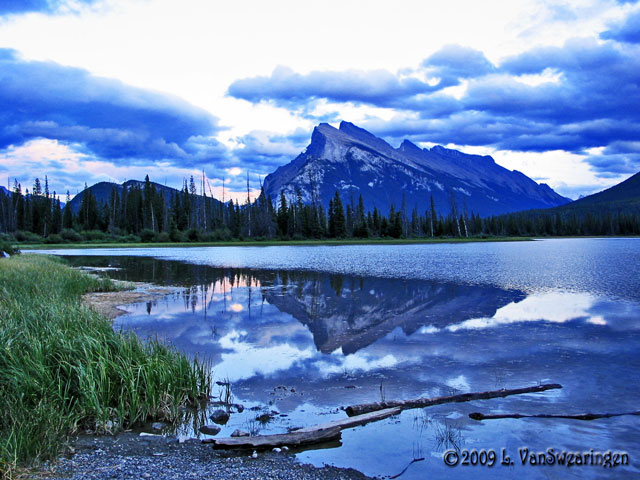
Mt. Rundle Reflections
‹ PreviousLandscape GalleryNext ›

Mt. Rundle Reflections

by Lucy VanSwearingen

Gallery: LandscapePosted July 21, 2010215 views11 comments
I still don't have very expensive equipment like I have in 35mm. So all my pics are taken with a Canon Powershot SX10IS

This is a view of Mt. Rundle reflecting on Vermillion Lake. I took this on a vacation to Banff, Alberta.
My husband went crazy waiting for me to get the "perfect" shot. I told him that the water had to be completely still. The look on his face was priceless!

Comments

11 comments
Comment posted by Dean Sauskojus on July 21, 2010 at 2:56 PM
Real nice reflection Lucy. Good thing you waited.
Registered on September 29, 2009, 137 Posts, 2659 Comments
Comment posted by Philip Hodgkins on July 21, 2010 at 3:39 PM
I like the composition—the grass, lake, trees and mountain are well placed. There is too much sky with blown highlights. I suggest cutting the sky in half as a first step. Removing the blue color cast would be the next. Pulling down the contrast and brightness of the sky would be a third, if there is any detail in the highlights.
Registered on July 24, 2006, 2741 Posts, 12349 Comments
Comment posted by Lon Overacker on July 21, 2010 at 5:36 PM
Lucy,

Welcome to NPN and the ES&S Gallery. Nice to have you here. You've captured a lovely scene from one of the most popular and beautiful locations in the world. Mt. Rundle is probably the most represented mountain - at least in this forum.

The composition is very nice and of course the reflection is beautiful; you certainly caught it at the right time.

You didn't mention if you were looking for a critique or if you had any specific questions. This is a critique forum so hopefully you don't mind the suggestions. I would agree with Phil about the color and highlights. I'm not sure what photo editing software you have, but I think by making some adjustments you could improve this image. This has an overall blue cast, but most notably in the mountain itself. As far as the bright sky goes, there are a few things that could be done, but mostly at time of capture, which it's too late for now. But many folks use graduated neutral density filters to reduce the large range of light between the sky and foreground. Also, many now use multiple exposures, bracketing, and then combining or blending them in PhotoShop. After the fact, you can selectively darken the highlights so the sky isn't so overwhelming. But again, not sure what you have or your experience with editing photos. One thing is for sure, if you ask the questions, there are many here willing to offer help and there is already lots of information posted on the various parts of this site.

Welcome aboard and we look forward to your participation.

Lon
Registered on November 24, 2006, 521 Posts, 19147 Comments
Comment posted by Eric Good on July 21, 2010 at 10:34 PM
Good on you for making him wait, but honestly I think the fact that the distant water is rippled and fg water smooth is my favorite part of this image... its kind of unique :smile: Composition looks good as well. Lon gave good advice on correcting the color cast and balance of exposure. It's mainly about one's passion and attitude rather than equipment, trust me... and you're well on the way.

~Eric
Registered on March 17, 2007, 116 Posts, 4764 Comments
Comment posted by Sulaiman Al-Riyami on July 21, 2010 at 11:03 PM
beautiful composition with a nice reflection of the mountain, the sky is blown out, thanx for sharing.

Sulaiman
Registered on July 19, 2010, 4 Posts, 24 Comments
Comment posted by Vance Gese on July 21, 2010 at 11:39 PM
Great composition with the nice diagonals and love the reflection. Bringing down the highlights in the sky and correcting the blue cast as Lon mentions would really help this sing. Welcome to the EES gallery and hope you will share more of your images.
Registered on November 13, 2008, 298 Posts, 6629 Comments
Comment posted by Lucy VanSwearingen on July 22, 2010 at 11:05 AM
thanks everyone. This is one of my first digital shots. The mirror on my Minolta Maxxum fell off (for the second time) on the first day of my vacation. So, I was desperate. My husband asked if not having a camera would ruin the vacation. What do I THINK I told him!!!

Anyway, I can see that I ignored the rule of thirds and should cut the sky....hope the blowout resolves itself with tweaking. And I'll definitely get rid of the blue cast. I actually gave the photo more saturation, because most of the photos I see on this site are "really" vivid. But, I see how it much it takes away from the scene.

Thanks so much!!! Anytime I post, I want and always NEED feedback!

I am very familiar with photoShop and its plug-ins, so I will get right to work.
Registered on May 23, 2009, 800 Posts, 2042 Comments
Comment posted by Lucy VanSwearingen on July 23, 2010 at 5:49 PM
Hi guys. Does this look better? I went back to the original and tweaked the color. The actual color , though, as I remember it, was bluer, more like the first photo.

but, alas, since this was my first time in digital, I probably did not pay much attention to my downloaded copy. And, now, I certainly don't remember the exact color. Could the color cast have been taken in the original?
Registered on May 23, 2009, 800 Posts, 2042 Comments
Comment posted by Gary Minish on July 27, 2010 at 2:02 AM
Lucy, you picked a great scene but one of the most difficult conditions a landscape photographer can be presented with. A bright overcast sky that overloads your camera's sensor while at the same time not providing enough strong light to capture the foreground properly. This is one of those shots where a tripod, multiple exposures and blending software works wonders to save the sky without blowing it out yet still giving you the colors and detail in the foreground. Despite the blown out sky, this photo can still look quite a bit better if the colors are were equalized properly. It doesn't look like your camera did you any favors here. I would like to show you what a difference some color adjustment could do if you would give me permission to do a screen capture, process it and repost it in a comment on this image. Oh, I forgot to mention that your composition is very good for this scene. It's nicely balanced and makes good use of the reflection.
Registered on February 4, 2006, 625 Posts, 3583 Comments
Comment posted by Lucy VanSwearingen on July 27, 2010 at 2:40 PM
Gary, you have my permission to tweak this photo yourself. I would love to see an expert's vision of what it should look like!

Thanks
Registered on May 23, 2009, 800 Posts, 2042 Comments
Comment posted by Gary Minish on August 20, 2010 at 4:32 PM
Hi Lucy,

Sorry it took me so long to get back to this. I basically backed off on the blue channel by a huge amount, played with the luminance curve a bit to recover detail in the shadows and then ran it through Topaz Denoise 5 to minimize the noise in the sky. I think you'll find this version significantly closer to reality.

Gary
Registered on February 4, 2006, 625 Posts, 3583 Comments