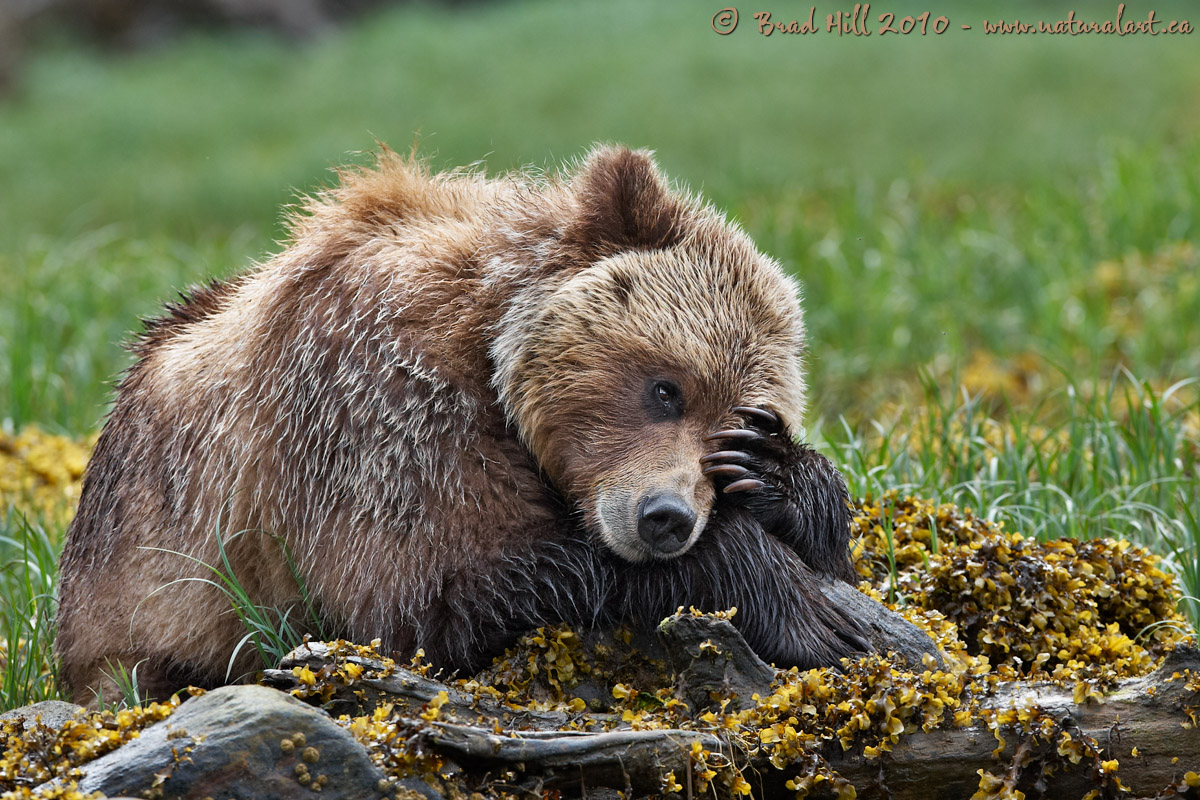
When viewing wildlife images, it's sometimes hard NOT to be anthropomorphic. For me, this is one of those times...it's hard for me to imagine that this bear is having anything BUT a bad day (and is hoping that tomorrow is better). This is a female bear (around 4 years old) that had been, for the week or so before I shot this image, romantically pursued by a number of adult male bears (and, to be honest, seemed confused by their intentions). The situation left me wondering if she was thinking about what the heck she had to do to get rid of those pesky males. I wasn't about to tell her...
I'm of the view that digital wildlife photography is a near perfect marriage of creativity and technical knowledge. Kind of a "right brain/left brain" thing. Even a "cute" image like this - where it seems like the image is totally dominated by what the bear is doing - illustrates the interplay between creativity and technical thinking...
With most wildlife images (including this one), one of the key things in making them work is to keep the image simple (and making it very clear where you want the viewer to look). One way to do this is to isolate (or separate) the subject from the background. And one way to do this is to soften up (i.e., throw out of focus) the background and ensure it isn't a distraction. But...you have to ensure that the critical portions of the subject - and in many cases all or most of the foreground - are in sharp focus. Many novice, and virtually all, intermediate level photographers know this principle, but when they get into a field situation they don't know what aperture to select (at a given distance, with a given lens) to produce the effect they know they want. What to do? Well, many "how-to" manuals and books talk about using your camera's depth of field preview button to force your camera to stop down (close the aperture to that which you've chosen) to "see" your depth of field. In theory, they're right. But in practice, when you do this the viewfinder darkens to the point where you really can't see exactly what is in focus and what isn't. An alternate approach available to those who have cameras with Live View (where you can view your image on your camera's LCD prior to exposure) is to check the depth of field using that function (as your LCD shows the effect of aperture choice on depth of field in real time). But...between the slow autofocus and lack of other critical info available on your LCD (of most implementations of Live View), it's rare that using Live View really works well when shooting wildlife images.
So what do you do to get the depth of field "right"? Well, I do something decidedly old-fashioned - I consult depth of field tables (which give the width of your depth of field, and how it is distributed in front of and behind your focal point). Mind you, I do it in a high tech way (on my iPhone or iPad)! And, because I can't do it fast enough in the field, I MEMORIZE (oooh, yuk!) the depth of field values for each of my telephoto lens for a few key distances. Yep, geek stuff. BUT, having this technical info in my head gives me an advantage - and removes the guesswork - when I'm choosing an aperture to produce an image with a specific creative look and feel to it.
Right brain - meet left brain! You're going to have to work together a LOT if you want to do some seriously interesting wildlife photography...
Subject: Female Grizzly Bear (
Ursus arctos) lamenting her life
Location: Khutzeymateen Inlet, BC, Canada
Camera: Nikon D3s
Lens: 400mm f2.8 VR - hand-held (VR on)
Exposure: 1/250s @ f6.3; ISO 250; -0.33 stop compensation from matrix-metered exposure setting of camera.
Crop: This is about 80% of full-framed image
All the contextual information surrounding this shot (including processing details) can be found here:
http://www.naturalart.ca/galleries/latest/.
All comments and critiques welcome, but probably better to view larger image first.
Cheers...
Brad
PS: I'll be away from tomorrow until Sunday (and likely without internet access)...so anything that goes wrong between now and Sunday is either Lon's or Vincent's fault!


Comments
22 commentsLove the dof of this shot, not to mention the sharpness and color. Your explanation of right and left brain working together is spot on - thanks for articulating it so well. As for consulting dof tables, I guess that's nearly the only thing that's good about having only one "workhorse" lens that's used for nearly all of my shots, makes it a lot easier to remember the dof sweet spot!
Great shot Brad, you truly are the "bear king"!
A fine example of technical and creative. After appreciating your image for all it is, I looked at the techs to check ISO and shutter speed to find (to my surprise) a relatively low ISO, given the wet and seemingly overcast conditions.
The DOF is near perfect, however the lowest portions of the shot look soft which to me almost looks like motion blur (of course I would expect this to be evidenced in other areas). So if it's not motion blur, it's just missing on the DOF. As such, I think stopping down 1 more would have produced the perfect look that you were after.
I think you're mostly seeing wet rocks and shadows in the foreground - if you saw the full res file it's not very soft in the foreground. Respectfully disagree about stopping down another stop (that would take me to f9) - if I did so the background would begin to come back too much and start becoming a little more of a distraction. But thanks for the suggestion, even if I did reject it outright!
Cheers...
Brad
Another very nice image and excellent tutorial on how to think in the field.
As always.....Thanks!
Ken Archer
Even if I was able to remember all the numbers, there is still the issue of guessing the right camera-to-subject distance. Unfortunately, no iPhone app for that yet.
As far as your post: AWESOME! This is one of my favorite Bear shots I have seen from you (and that is saying a lot, because I like all your bear shots). I just like the personality of the bear.
Third, can you tell me which iPhone app contains DOF tables? I have an iPhone and don't have that app yet.
I have both DOFMaster and DOFCalcV1. Both seem fine, for some reason I tend to use DOFMaster a little more, but either should do the trick (and I've had these awhile, so there may be others out there now.
Brad
Great advice on the depth of field as well.