Nature Photographers Network
This is the preserved archive of the original Nature Photographers Network. The community continues at naturephotographers.network.
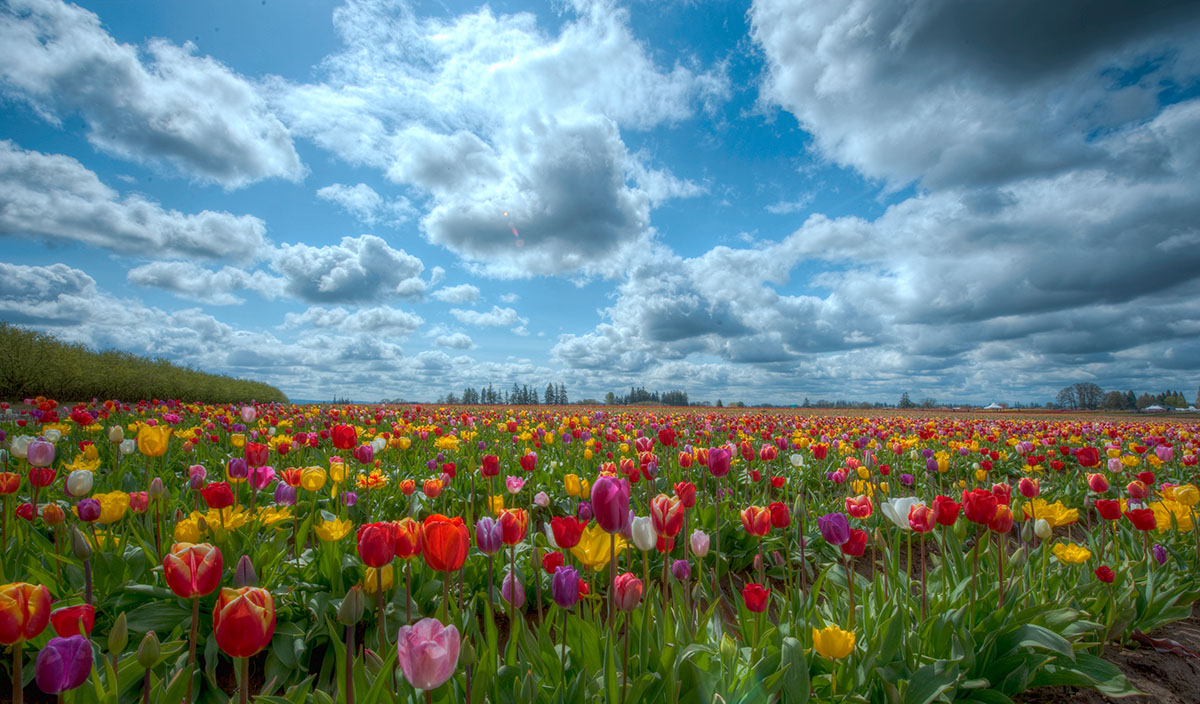
Tulips with Clouds
‹ PreviousLandscape GalleryNext ›

Tulips with Clouds

by Chad Delany

Gallery: LandscapePosted April 11, 2010513 views17 comments
I took this at the Tulip Festival in Woodburn, Oregon. I was shooting into the sun and used a 7 bracket HDR process but can't remember if I had to use exposure compensation or not.
Nikon D700
14-24mm f/2.8 lens at 14mm and f/22

All critique and suggestions are welcome.
Thanks,
Chad

Comments

17 comments
Comment posted by Richard Hartmann on April 11, 2010 at 3:13 PM
Outstanding!!! I really like this bright happy Pic. The tulips are wonderful and the sky could not be better.

The large pic rocks.

I like the way the rows are not so visible. I think this makes the field look more natural.

The trees on the left look a bit HDRish on my monitor but this is no big deal.
Registered on January 15, 2009, 13 Posts, 772 Comments
Comment posted by Bill Fach on April 11, 2010 at 4:06 PM
Chad: Makes me want to go there! Outstanding shot.>=))>
Registered on November 1, 2003, 1805 Posts, 26981 Comments
Comment posted by Paul Duval on April 11, 2010 at 7:46 PM
Chad,

Very nice flower shot with a wide spectrum of colors. I like the low angle, it makes the flowers glow. One small nit, the highlight n the cloud in the middle upper part of image is vergingon being blown out.But t's very minor. You inspired me to post my Gorman shot.

Paul
Registered on June 30, 2009, 508 Posts, 1907 Comments
Comment posted by Robert Dayton on April 11, 2010 at 8:04 PM
Lovely, Chad. The sky is very complementary. Your HDR bracketing
really paid off here.
Registered on November 11, 2008, 281 Posts, 3958 Comments
Comment posted by Chad Delany on April 11, 2010 at 8:31 PM
Thanks for the comments. I thought the flowers glowed a little too much. Here is a slightly different attempt.
Registered on January 27, 2010, 17 Posts, 21 Comments
Comment posted by Richard Hartmann on April 11, 2010 at 10:07 PM
I like the new pic better. The flowers look more real.
Registered on January 15, 2009, 13 Posts, 772 Comments
Comment posted by Russell Colletta on April 11, 2010 at 10:50 PM
The large image ranks high in "wow factor". The colors and light are electric.
Registered on October 31, 2009, 114 Posts, 1008 Comments
Comment posted by Morris McClung on April 11, 2010 at 10:56 PM
Definitely like the repost better. You balanced the light and made it look much more real. I really like the comp and color. Excellent work. One tiny nit is to remove the lens flare in the middle cloud.
Registered on May 7, 2007, 670 Posts, 19650 Comments
Comment posted by Dean Sauskojus on April 12, 2010 at 12:20 AM
Some beautiful colors and I really like the sky with the big heavy clouds.
Registered on September 29, 2009, 137 Posts, 2659 Comments
Comment posted by Kevin Hillegass on April 12, 2010 at 2:56 AM
Hi Chad,

What day were you there? I was there last Sat and last Weds. Maybe this Tues?

I like your wide angle view on this. Adding to what was mentioned above, I think if you tone down the highlights from the middle clouds, remove the lens flare, and tidy up dust spots, etc, this could be a good runner for the photo contest.

I'll have to post mine so we all can appreciate Woodburn. It's a fun place for flowerheads (like me :biggrin: ).

BTW, I'm also a mountainhead, waterfallhead, and beachhead (we're lucky to be in OR)!

Kevin

UPDATE: Hope this is OK, but I played with it a little in CS2, and a contrast mask over the whole image, sky selection and hue/sat cyan reduction of 50%, and some selective highlight burning in the bright clouds did wonders to this. Flare and dust spots could easily be cloned out.

Hope this helps.
Registered on August 11, 2004, 29 Posts, 166 Comments
Comment posted by Nick Moore on April 12, 2010 at 9:06 AM
This is a really nice image, I like the re-posted version, colours are great!. I like Kevin's suggestions above (flare, dust spots, and taking out a touch of cyan), beautiful work!.
Registered on May 23, 2006, 93 Posts, 2228 Comments
Comment posted by Chad Delany on April 12, 2010 at 1:57 PM
Thanks for all the comments. I was there on Friday, after it stopped raining. Kevin, thanks for pointing out the dust spots. I missed seeing those. It must have been on my lens since it isn't in my other shots with different lenses.

I'm still getting used to Photoshop. I did use the Topaz Adjust & DeNoise plugin on this shot. Where is the contrast mask you were talking about?

Could you post how the image looks after your adjustments? Thanks for all the help and suggestions.

Cheers,
Chad
Registered on January 27, 2010, 17 Posts, 21 Comments
Comment posted by R.Bill Moser on April 12, 2010 at 1:58 PM
I love the perspective and the sky with the cloud pattern. I like the repost better. The light is more balanced. I love the comp with those tulips in the foreground.
Registered on January 29, 2010, 285 Posts, 4281 Comments
Comment posted by Lon Overacker on April 12, 2010 at 5:40 PM
Chad,

A beautiful Tulip landscape indeed. Eye-popping color that still looks great (and more natural) in your repost. Also agree you did a great job in the capture and minimizing the rows and cultivated look we most often associate with fields of Tulips.

Speaking of which, we could have and probably should have moved this to Man & Nature. The structures in the background aren't a big deal and not a major element in the composition, but in general, "cultivated" crops, agriculture, etc. are considered "hand of man." We try and be pretty easy going around here, which sometimes gets interpreted as being inconsistent.... but then also just want to give folks a chance to understand for future postings. No biggie... - and thanks for posting - it's a beautiful image.

Lon
Registered on November 24, 2006, 521 Posts, 19147 Comments
Comment posted by Kevin Hillegass on April 13, 2010 at 2:12 AM
Hi Chad,

I sent you an email about what I was talking about. Contrast mask, digital grad, hue/sat cyan reduction, local highlight burning, curves, cloning. All of this I came up with when I had Photoshop Elements, so there's no button for the first two items.

Contrast Mask: http://www.luminous-landscape.com/tutorials/contrast_masking.shtml but I used different blurring values.

Digital Grad: http://www.luminous-landscape.com/tutorials/digital_split.shtml. Although my method is different, this will give you a similar result.

Hue/sat, curves, & cloning done as usual.

Oh, I also sharpen with a high-pass fillter/unsharp mask combination to really make it pop.

That's it. I don't do scripts b/c I want to remember how to do it myself.

Kevin
Registered on August 11, 2004, 29 Posts, 166 Comments
Comment posted by Chad Delany on April 13, 2010 at 12:05 PM
Thanks for pointing that out Lon. I'll post my other tulip pictures in that section. Thanks Kevin for the links. I'll check it out. Thanks everyone for all the comments.

Here is Kevin's reprocessing.
Registered on January 27, 2010, 17 Posts, 21 Comments
Comment posted by Ken Johnson on April 17, 2010 at 9:42 PM
Nice colors & field of tulips Chad. Nice Job! :toast:
Registered on March 7, 2010, 71 Posts, 272 Comments