Nature Photographers Network
This is the preserved archive of the original Nature Photographers Network. The community continues at naturephotographers.network.
Great Blue Heron
‹ PreviousAvian GalleryNext ›

Great Blue Heron

by Mike Bonar

Gallery: AvianPosted February 7, 201080 views6 comments
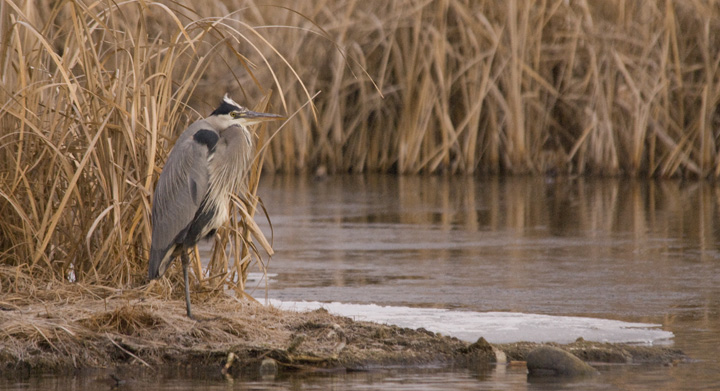
I don't get the opportunity to photograph birds, but was able to capture this great blue heron this morning. I liked the texture of the cattails and the portrait of the bird. I appreciate any comments or suggestions for improving my bird photography.

Thanks for taking a look!


Nikon D 200
VR 80-400 mm
shutter 1/400
f .3
focal lenght 400 mm
ISO 1250
Shutter Priority

Comments

6 comments
Comment posted by dan elster on February 7, 2010 at 4:47 PM
Great setting and composition. To me, this seems to be lacking in contrast and sharpening. Just a few tweaks and I think this will really shine! :toast:
Registered on September 23, 2005, 299 Posts, 2443 Comments
Comment posted by Buck Ward on February 7, 2010 at 6:35 PM
I agree with Dan. The setting and composition is good but it looks like it must have been a cloudy day, so it needs a little punching-up to mitigate for the flat light. Also the head and eye look a bit soft, which could be a result of the downsizing.
Registered on December 8, 2003, 96 Posts, 1917 Comments
Comment posted by Ed Dubois on February 7, 2010 at 6:38 PM
I too agree with Dan. The light and color tones are appealing.
Registered on February 22, 2005, 129 Posts, 4739 Comments
Comment posted by Mike Bonar on February 7, 2010 at 8:03 PM
Thanks for the comments. This was taken on a cloudy day. I have worked with brightness, contrast, etc. I have also corrected the white balance for the cloudy conditions. Any ideas??

Thanks
Registered on November 11, 2009, 25 Posts, 50 Comments
Comment posted by Richard Ditch on February 7, 2010 at 9:51 PM
This is one of the few situations where the auto levels option can be useful.

Add a levels adjustment layer and make sure he black eyedropper is reset to something like 20/20/20 and the white eyedropper is reset to something like 245/245/245 (these settings help prevent clipping of the histogram). Then click on the "auto" option and see how it neutralizes the color cast in this image.

To perk it up a bit more add a curves adjustment layer and select the "linear contrast" preset.

Since you are doing both changes as adjustment layers you can then fine tune them by reducing the opacity or either or both layers.

I like the setting and the composition here. With a mild tune-up this image becomes stronger IMO.
Registered on November 1, 2003, 1031 Posts, 12705 Comments
Comment posted by Mia McPherson on February 8, 2010 at 8:32 AM
Mike,

I agree with every thing Rich has said and following his steps will produce a stronger image.

I love the setting you have and the bird's pose too.
Registered on June 25, 2007, 491 Posts, 12566 Comments