Nature Photographers Network
This is the preserved archive of the original Nature Photographers Network. The community continues at naturephotographers.network.
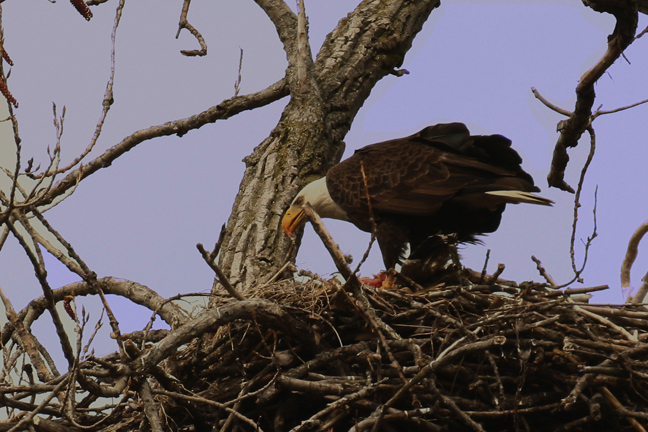
Eagle at nest
‹ PreviousAvian GalleryNext ›

Eagle at nest

by John Tobias

Gallery: AvianPosted November 16, 2009171 views10 comments
Photo was taken in the early spring 2008. The pair raised 3 eaglets. Canon Rebel XTi, 1/160, f-16, 135-400mm lens at 400mm, ISO 400, tripod, Partial metering. The entire area was very cloudy and overall grey. You had to shoot from a platform about 75-100 feet from the nest at an up angle. I am looking for suggestions on how to improve the shot, if the eagles return to the nest in the spring. For some reason they abandoned the nest this spring, which was a very wet and cold spring.

Comments

10 comments
Comment posted by Nate Chappell on November 16, 2009 at 11:26 AM
Hi John, I'd like to see it a larger size than posted to assess image quality but from what I can see it looks a little soft. I don't think you need that much depth of field from that long of a distance, I would go to a larger apeture say F8 or F11 and you would get a corresponding increase in shutter speed which would help to offset any movement of the bird or lack of stability. I think there might be a small magenta cast to the image. It's a nice look at the nest, good luck this spring. :toast:
Registered on February 1, 2006, 1158 Posts, 19528 Comments
Comment posted by Luke Ormand on November 16, 2009 at 12:04 PM
There are some serious post processing artifacts that are showing up here - there's virtually no detail in the head of the eagle, and you clealry have added a purple BG, and I hate to see it, but did an awful job of it. Aside from varying in tone, there are many areas that are still grey (mostly on the left side). Can you please post the original so we can see what you are starting with? It doesn't look like the original would be a bad image - just a little dark. As Nate pointed out, f/8 would have served you better. Thank you.


- Luke
Registered on February 4, 2009, 1093 Posts, 7035 Comments
Comment posted by Nate Chappell on November 16, 2009 at 12:14 PM
Luke - I doubt that John "added" the color of the sky bg on purpose, it's much more likely a color cast from processing.
Registered on February 1, 2006, 1158 Posts, 19528 Comments
Comment posted by John Tobias on November 16, 2009 at 12:16 PM
I will try to repost. The image is soft. I have found that the lens I used just does not produce a sharp image at 400mm unless you can focus very well. Which with my eyesight is sometimes difficult to do. As far as the purple background, It showed up when I was trying to increase the contrast. Will welcome suggestions on how to boost contrast and keep the background OK.
Registered on September 12, 2009, 2120 Posts, 6455 Comments
Comment posted by Nate Chappell on November 16, 2009 at 12:22 PM
A couple of things jump to mind here, 1) Are you using Autofocus? 2) This particular lens I have often heard is sharper at about 380mm than 400mm, so I would recommend trying that.

As far as contrast, one way I like to boost the contrast in my images is to due a slight reverse S curves adjustment. I find that if you use the auto levels adjustment, you can often end up with strange color casts such as this one, if you are using levels it's much better to adjust the sliders to adjust the contrast.
Registered on February 1, 2006, 1158 Posts, 19528 Comments
Comment posted by John Tobias on November 16, 2009 at 12:46 PM
Re-post of the original shot. I may have used a 1.4 xtender, but do not recall as I was trying a variety of lenses and xtenders to get a bigger image. I just replaced the 135-400 with the 150-500, but due to the nasty weather have not had a chance to get out and see how it well it works.
Registered on September 12, 2009, 2120 Posts, 6455 Comments
Comment posted by Luke Ormand on November 16, 2009 at 2:18 PM
Thank you for posting the original. I would do as Nate suggested with a slight reverse S on curves in Photoshop to increase the contrast. If you used a TC that would explain the soft image and lack of contrast since TCs shouldn't be used with non-primed lenses because of increased aperture, decreased quality, and lack of an autofocus. If you right click on the original image and look at properties, it should list the focal length in the exif data which would let you know if you used it or not.

- Luke
Registered on February 4, 2009, 1093 Posts, 7035 Comments
Comment posted by Mia McPherson on November 16, 2009 at 8:39 PM
John

I really do not find the angle too steep in your image, it is a nest in a tree. One thing to think about is to try to capture the eagle or eagles closer to the edge of the nest and try to get the feet visible, I think that would help a bit with the angle issue.

I think the repost looks more naturally colored than the original image, but it appears a bit soft & flat.

At the distance you were from the Eagle I agree with Nate that between F8 and F11 would have been a good dof and your image may have been sharper. I probably would have also used some positive EV.
Registered on June 25, 2007, 491 Posts, 12566 Comments
Comment posted by Kenneth Arni on November 17, 2009 at 5:29 AM
I like the repost with the added detail it gave in the dark body of the bird. It looks to me like it was a cloudy day and maybe next time with a little more light this would make a great shot. :smile:
Registered on December 24, 2008, 112 Posts, 629 Comments
Comment posted by John Tobias on November 17, 2009 at 10:09 AM
Thank you all for your comments. They have given me some ideas if the eagles return in the spring. In addition to the new 150-500mm Sigma lens I now have the Rebel XSi with the live view feature, which helps me with focusing. Thanks again.
Registered on September 12, 2009, 2120 Posts, 6455 Comments